You can navigate around sFlowTrend-Pro by selecting tabs in the Tab bar to view and analyse the sFlow data. In addition, sFlowTrend-Pro includes a History navigator.
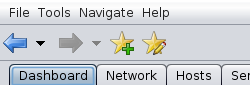
When you move to a different tab or you change the settings in
the viewed tab (for example changing the selected switch, interface
or chart in the Network > Flows tab),
the History navigator automatically saves
the tab and its settings changes in the history of viewed
tabs and their settings. You can use the
 and
and
 buttons to move backwards and forwards through the history
of viewed tabs and their settings, in much the same way as you
would use the back and forward buttons in a web browser to
navigate through the history of viewed web pages.
buttons to move backwards and forwards through the history
of viewed tabs and their settings, in much the same way as you
would use the back and forward buttons in a web browser to
navigate through the history of viewed web pages.
The History navigator also includes the ability to bookmark favourite tabs and their settings so that you can return to a tab configured with the saved settings at a later time. This is particularly useful if your favourite tabs include many special settings (eg filters).
![[Note]](img/note.png) |
Note |
|---|---|
You can also access the functions of the History navigator using the menu. (see Section 16.1, “Menu reference”) |
When you have configured a tab with useful settings and would
like to save these settings so that you can return to the tab
already configured with the settings, you can click the
 to save a bookmark. This will bring up the
Add bookmark dialog which allows you to
name the bookmark and choose a folder in which to save the
bookmark.
to save a bookmark. This will bring up the
Add bookmark dialog which allows you to
name the bookmark and choose a folder in which to save the
bookmark.
To view all the saved bookmarks click on the
 button. This will bring up the
Show all bookmarks dialog.
This dialog can also be accessed by selecting
→
button. This will bring up the
Show all bookmarks dialog.
This dialog can also be accessed by selecting
→
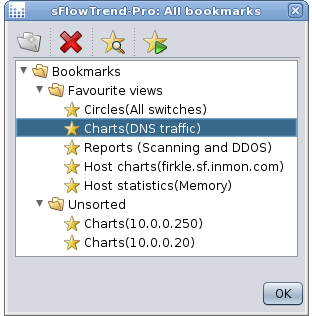
The dialog displays the saved bookmarks in a hierarchical tree view of folders and bookmarks. You can use this dialog to add new folders, rename bookmarks and folders, delete bookmarks and folders and use drag and drop to rearrange bookmarks and folders.
In addition, in the dialog toolbar, you can click on the
 button to view the settings saved in the currently selected
bookmark or click on the
button to view the settings saved in the currently selected
bookmark or click on the
 button to go to the tab configured with the settings saved
in the currently selected bookmark.
button to go to the tab configured with the settings saved
in the currently selected bookmark.